Never Let Claude Code Stop: Free-Model Fallback with OmniRoute
Keep coding when your Pro limit hits — a local router, a free-model combo, and a one-command resume
Hit your Claude Pro limit mid-task and the session grinds to a halt. Here's how I keep going — routing Claude Code through a local OmniRoute gateway to a free-model 'combo', with a one-command resume that continues the exact same conversation. No paid API keys, no account risk.
🎙️ Podcast episode coming soon
This article will be converted into a podcast using NotebookLM
You're three files deep into a refactor, Claude Code is humming along, and then it happens: "You've reached your usage limit." The session stalls. You either wait for the window to reset or lose your flow. I wanted a third option — keep the conversation alive on free models until my Pro limit resets. Here's the setup I landed on: a local OmniRoute gateway, a free-model fallback combo, and a Claude Code profile I can switch into without losing context. No paid API keys, and — importantly — nothing that puts my subscription account at risk.
What Is OmniRoute?
OmniRoute is a free, open-source AI gateway you run locally. It speaks the OpenAI- and Anthropic-compatible API, so tools like Claude Code can point at it instead of talking to Anthropic directly. Behind that single endpoint it can route to hundreds of providers — including 90+ free tiers — with automatic fallback when one runs out. I run it as a Docker container so its database and logs live in a folder I control. Once it's up, the dashboard and API sit at http://localhost:20128.
Where These Files Live
Everything sits in one folder. Create a fresh directory — I'll call it omniroute/ — and put the two files from the next steps inside it. The first time you start the container, it creates data/ and logs/ right beside them. That's the whole layout; nothing lives outside this folder.
omniroute/
├── docker-compose.yml   # you create this (Part 1)
├── .env                 # you create this (Parts 2-3)
├── data/                # auto-created on first run — SQLite DB + backups
└── logs/                # auto-created on first run — application logs
Setup, Part 1 — The docker-compose.yml
OmniRoute ships as a Docker image, so a small compose file is all you need. It maps two host folders — one for the SQLite database, one for logs — into the container so your data survives restarts, publishes the single port 20128, and adds a health check. Save this as docker-compose.yml in a fresh folder. The relative ./data and ./logs paths keep everything self-contained in that folder. One detail worth keeping: APP_LOG_FILE_PATH points the app's log file into the mounted /app/logs folder — without it, logs default to a subfolder of the data dir and your ./logs mount stays empty.
services:
  omniroute:
    image: diegosouzapw/omniroute:latest
    container_name: omniroute
    restart: unless-stopped
    ports:
      - "20128:20128"
    env_file:
      - .env
    environment:
      - NODE_ENV=production
      - PORT=20128
      - DATA_DIR=/app/data
      - APP_LOG_TO_FILE=true
      - APP_LOG_FILE_PATH=/app/logs/application/app.log
    volumes:
      - ./data:/app/data
      - ./logs:/app/logs
    healthcheck:
      test: ["CMD", "curl", "-f", "http://localhost:20128/api/monitoring/health"]
      interval: 30s
      timeout: 10s
      retries: 3
      start_period: 20s
Setup, Part 2 — Generate Your Secrets
OmniRoute needs three secrets before first run: a database encryption key, a JWT signing key, and an API-key encryption key. Never reuse someone else's — generate your own. Two rules that save real pain: set STORAGE_ENCRYPTION_KEY and API_KEY_SECRET once and never change them (rotating them makes previously stored data undecryptable), and keep all of these out of version control.
# Run each and copy the output into your .env (next step)
openssl rand -hex 32     # -> STORAGE_ENCRYPTION_KEY
openssl rand -base64 48  # -> JWT_SECRET
openssl rand -hex 32     # -> API_KEY_SECRET
Setup, Part 3 — The .env File
The compose file reads this .env. Paste your generated secrets in place of the placeholders and choose your own admin password — everything below is a placeholder, no real credentials. Provider API keys are optional and left commented; the free tier and the fallback combo work without them. One warning worth repeating: if you ever add a real proxy here, make sure it is reachable, or every upstream call fails. Add .env, data/ and logs/ to your .gitignore.
# ---- Required secrets (paste your own from Part 2) ----
STORAGE_ENCRYPTION_KEY=REPLACE_WITH_OPENSSL_HEX_32
JWT_SECRET=REPLACE_WITH_OPENSSL_BASE64_48
API_KEY_SECRET=REPLACE_WITH_OPENSSL_HEX_32

# Admin dashboard password — change after first login
INITIAL_PASSWORD=choose-a-strong-password

# ---- Server ----
NODE_ENV=production
PORT=20128
DATA_DIR=/app/data
APP_LOG_TO_FILE=true

# ---- Optional provider API keys (uncomment + add your own) ----
# GEMINI_API_KEY=
# GROQ_API_KEY=
# OPENROUTER_API_KEY=
Start OmniRoute
From the folder holding your docker-compose.yml and .env, bring it up. The first run pulls the image; after that it starts in seconds. It's healthy once the monitoring endpoint returns 200, and the dashboard opens at http://localhost:20128 — log in with the INITIAL_PASSWORD you set. In Docker Desktop it shows up as the omniroute container (image diegosouzapw/omniroute, port 20128:20128), grouped under your omniroute folder — exactly as below.
docker compose up -d

# Healthy when this returns 200:
curl http://localhost:20128/api/monitoring/health

OmniRoute running in Docker Desktop: one container from diegosouzapw/omniroute, port 20128 mapped, status green.
Feature 1 — Point Claude Code at OmniRoute's Free Models
Claude Code reads a few environment variables at startup that decide where its requests go. Set them in a project's .claude/settings.json (or your global ~/.claude/settings.json to apply everywhere) and Claude Code talks to OmniRoute instead of Anthropic. The token is whatever your OmniRoute instance expects; the model 'auto/best-free' tells OmniRoute to pick the best available free model automatically. One catch — don't put /v1 in the base URL; Claude Code appends the path itself. Env is read once at startup, so fully quit and reopen the app after editing.
{
  "env": {
    "ANTHROPIC_BASE_URL": "http://localhost:20128",
    "ANTHROPIC_AUTH_TOKEN": "omniroute",
    "ANTHROPIC_MODEL": "auto/best-free",
    "CLAUDE_CODE_DISABLE_NONESSENTIAL_TRAFFIC": "1"
  }
}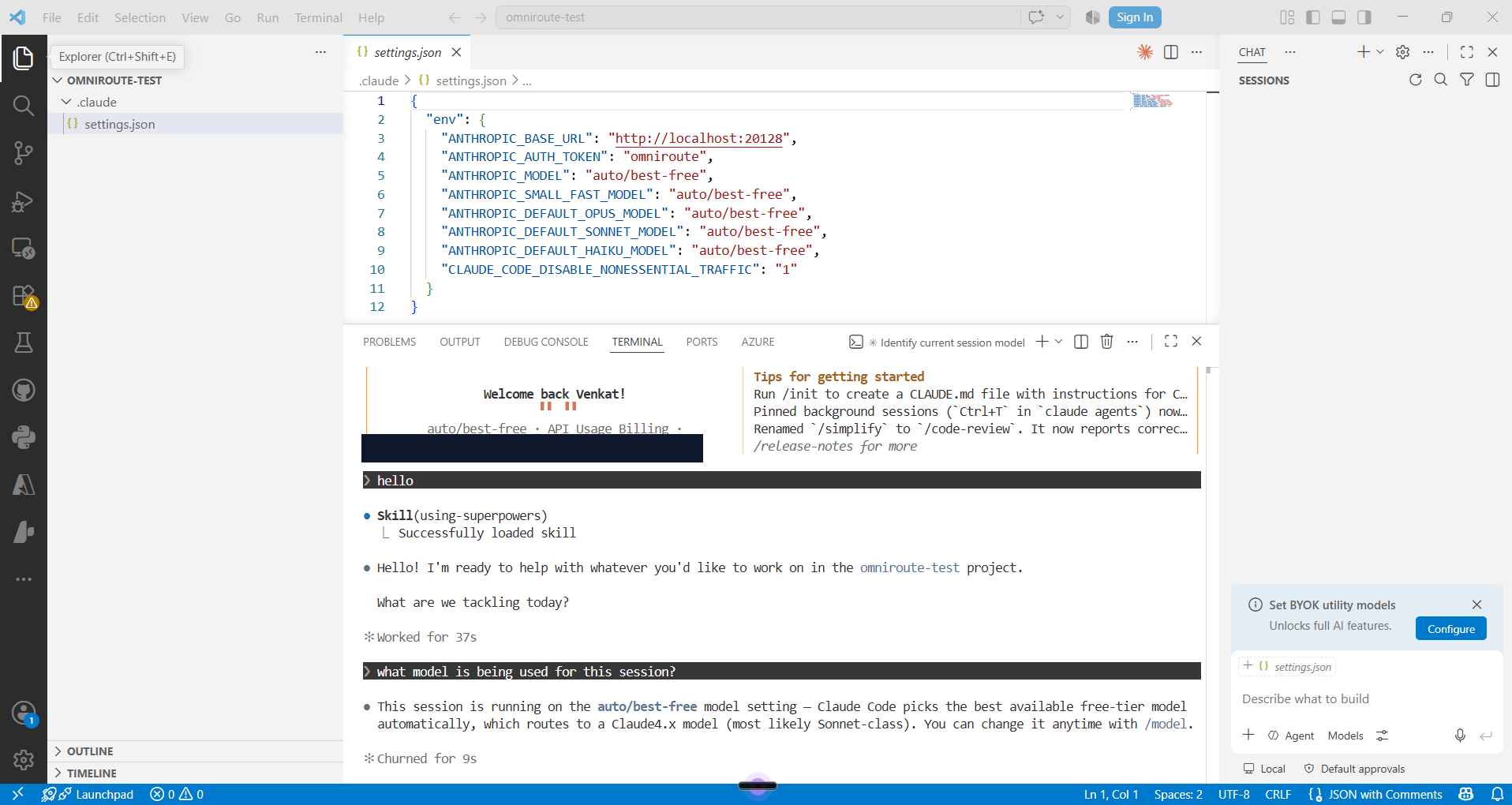
Claude Code wired to OmniRoute: the settings.json env block, and the session banner confirming it's running on the free 'auto/best-free' model.
Feature 2 — Build a 'free-fallback' Combo
A single free model can also run dry. A Combo is OmniRoute's answer: an ordered chain of models with a routing strategy. With the 'priority' strategy it tries the first member and only drops to the next on failure or a rate limit — so your session cascades down a ladder of free models instead of stopping. You build one in the OmniRoute dashboard (Combos → Create), name it, pick the 'priority' strategy, and add free providers as steps in the order you want them tried. Only providers showing at least one connected account will actually serve traffic, so start with the ones that are ready and add more later.
- Name it something memorable — I used 'free-fallback'.
- Strategy: Priority (ordered failover, not load-balancing).
- Add members top to bottom — best/fastest free model first, broad catch-all last.
- Activate it. It now shows up as a model you can target by its name: 'free-fallback'.
Add the Combo to a Claude Code Profile
OmniRoute can launch Claude Code with a dedicated profile — a separate config directory at ~/.claude/profiles/<name> — so your 'free' setup never disturbs your normal Pro configuration. Create a profile folder with a settings.json that points ANTHROPIC_MODEL at your combo. Now you have two clean modes: normal Claude Pro in the official app, and a 'free' profile that routes everything through the combo.
{
  "env": {
    "ANTHROPIC_BASE_URL": "http://localhost:20128",
    "ANTHROPIC_AUTH_TOKEN": "omniroute",
    "ANTHROPIC_MODEL": "free-fallback",
    "ANTHROPIC_SMALL_FAST_MODEL": "free-fallback",
    "CLAUDE_CODE_DISABLE_NONESSENTIAL_TRAFFIC": "1"
  }
}
Resume the Session When the Limit Hits
This is the part that saves the day. When Claude Pro says the limit is reached, you don't start over — you continue the exact same conversation on free models. OmniRoute's launch command sets the env from your profile and passes flags straight through to Claude Code, so '--continue' resumes your last session. When your Pro window resets, drop the profile flag and you're back on Pro. One command bridges the gap, and your context comes with you.
# Pro limit hit? Continue the SAME conversation on free models:
omniroute launch --profile free --continue

# Later, when your Pro window resets, launch Claude Code normally again.
One Honest Caveat: Stay Within Terms
It's tempting to go a step further and route your Claude Pro or ChatGPT Plus login itself through the gateway. Don't. Those subscription tokens are authorized for use inside their official apps, not for proxying through a third-party router — and heavy agent traffic is exactly the pattern that gets accounts rate-limited or banned. OmniRoute even warns you before connecting them. The setup here deliberately avoids that: your paid plans stay in their official clients, and the fallback uses only free models. Best of both worlds, zero account risk.
Fun Fact
OmniRoute reaches 90+ free provider tiers through a single endpoint — enough that its 'auto' routing works out of the box with zero credentials. The whole idea borrows from an old networking term, 'failover': when one path dies, traffic quietly takes the next.
The Takeaway
The goal was never to squeeze free tokens — it's to never lose momentum. Claude Pro does the heavy lifting; when it needs a breather, a local gateway and a free-model combo keep the conversation alive; and one '--continue' stitches it all back together. Set it up once, and "usage limit reached" stops being a full stop.